
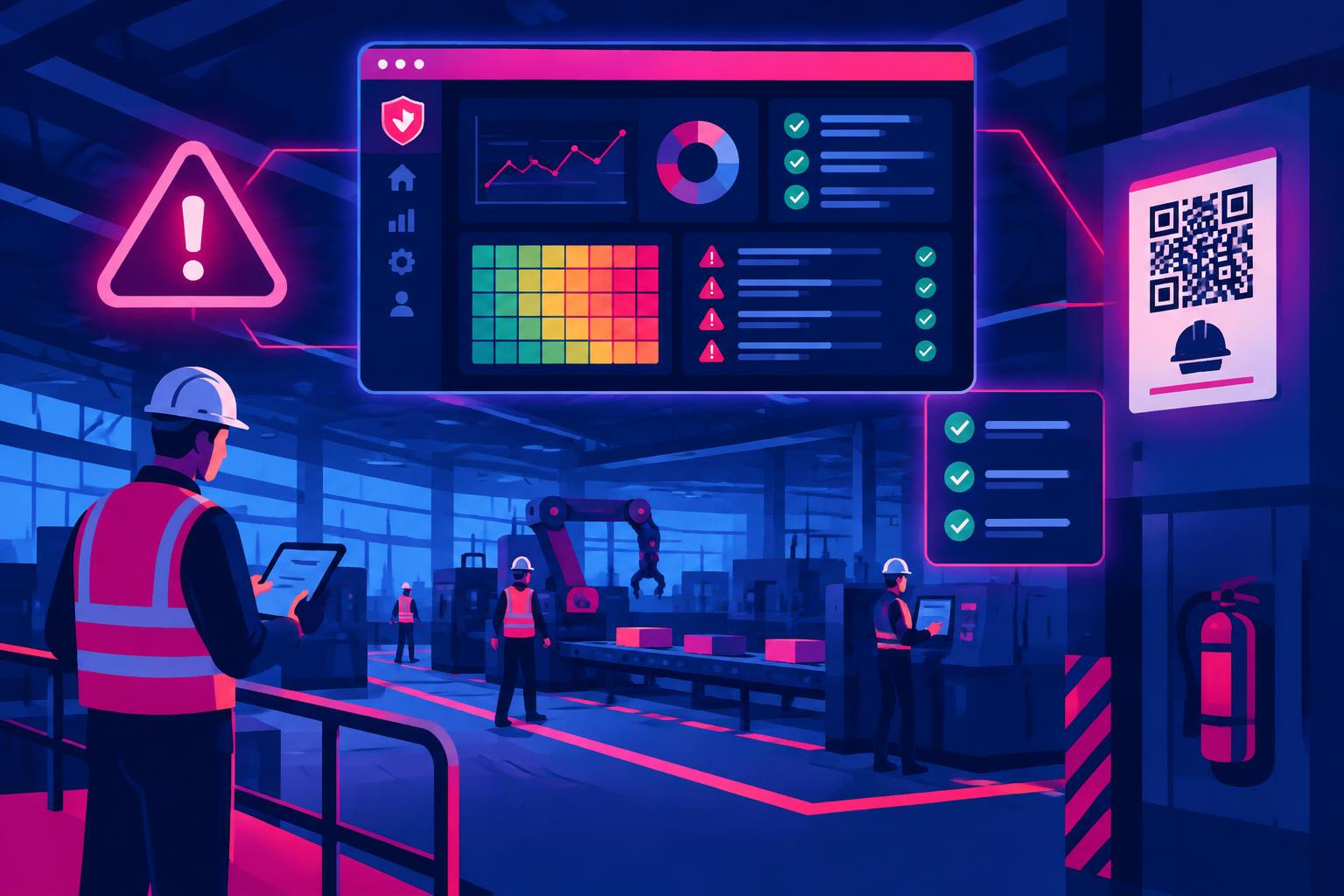
SurveilSync Tech Inc came to IPRS Consultants with a clear brief: build one platform that takes every hazard from the moment a worker spots it to the moment a fix is verified and closed. It had to follow a recognized safety management framework, work on a phone on the shop floor and leave a full audit trail behind every decision.
The result is SurveilSync OSH, a cloud-based occupational safety and health management system built on the ILO-OSH 2001 guidelines. It gives safety teams working to OSHA requirements and NEBOSH-trained professionals one workspace for the whole safety lifecycle.
| At a glance | |
|---|---|
| Client | SurveilSync Tech Inc |
| Product | SurveilSync OSH, an occupational safety and health management system |
| Built by | IPRS Consultants |
| Framework | ILO-OSH 2001, with 90+ requirements mapped |
| Built for | Safety teams working to OSHA requirements and NEBOSH-qualified HSE professionals |
| Scope | 13 functional modules, a 12-stage incident lifecycle, 7 report types |
| Platform | Cloud web app, mobile-ready, multi-site and multi-department |
| Intelligence | AI-assisted triage, risk scoring, root-cause analysis and action recommendations |
Key takeaways
- SurveilSync OSH turns the ILO-OSH 2001 cycle (Policy, Organising, Planning, Evaluation, Improvement) into daily workflows.
- Every incident moves through 12 controlled stages, from Draft to Closed, with role-based approvals and a timestamped audit log.
- Incidents, inspections, meetings, training and drills all feed one corrective and preventive action (CAPA) register, so no finding is left without an owner.
- Built-in AI suggests risk scores, drafts root causes and recommends corrective actions. People stay in charge of every decision.
- Workers can report a hazard in seconds by scanning a QR code poster at their site.
The problem: safety on paper, risk on the floor
Ask any HSE manager where their safety data lives, and the honest answer is "everywhere." Near misses in a WhatsApp group. Inspection notes in a notebook. Training sign-in sheets in a filing cabinet. Corrective actions in a spreadsheet that three people edit and nobody owns.
That scattered system creates three real dangers:
- Hazards go unreported. If reporting means finding a form, filling in a page and emailing a supervisor, a busy worker will skip it. The near miss that could have warned you becomes next month's injury.
- Actions fall through the cracks. An inspection finds a blocked fire exit. Someone writes it down. Six weeks later, nobody can say whether it was fixed, who fixed it or when.
- You can't prove what you did. When a regulator, client or certification auditor asks for evidence, the team spends days pulling records together instead of pulling up one report.
The frameworks that NEBOSH-trained professionals and OSHA-focused safety teams work to all point the same way: identify hazards, assess risk, act, check, improve. The problem was never knowing what to do. It was having a system that makes it happen every day, for every hazard, at every site.
The brief: what SurveilSync needed
SurveilSync Tech Inc set out its requirements clearly. IPRS Consultants turned each one into a design rule for the platform.
| Requirement | What it meant in the build |
|---|---|
| Follow a recognized OSH management framework | Map the platform to the ILO-OSH 2001 cycle, with 90+ requirements catalogued across 15 clause groups |
| Cover the full incident lifecycle | A 12-stage workflow from Draft to Closed, with no stage skipped |
| Make clear who is accountable | Five roles with rights set per user, and each lifecycle stage mapped to a responsible role |
| Close every finding | One CAPA register fed by incidents, inspections, meetings, training and drills |
| Leave an audit trail | Auto-generated IDs, timestamped audit logs and evidence attached to every record |
| Work in the field | A responsive web app plus QR-code posters for one-scan hazard reporting |
| Scale across the business | Multi-site, multi-department and configurable without code changes |
| Use AI responsibly | AI suggests; a named person confirms, approves or rejects |
The solution: one workspace for the whole safety lifecycle
SurveilSync OSH is built around the five-step ILO-OSH 2001 management cycle. Each step has its own tools, and each one feeds the next.
| ILO-OSH 2001 step | What SurveilSync OSH provides |
|---|---|
| 1. Policy | A searchable OSH policy catalogue and worker participation through open reporting |
| 2. Organising | Roles, responsibilities, training records and competence tracking |
| 3. Planning and implementation | Risk assessment, workplace inspections, emergency drills and change control |
| 4. Evaluation | Live dashboards, investigations and a complete audit trail |
| 5. Action for improvement | A unified CAPA register with verified closure |
How it supports OSHA and NEBOSH practice
SurveilSync OSH is not a certification and does not replace a competent safety professional. What it does is give OSHA-focused teams and NEBOSH-trained practitioners a system that runs the practices they already know:
- Hazard identification and reporting: any worker can report a hazard, near miss or incident in seconds, including by scanning a QR poster.
- Risk assessment: every event is scored on likelihood and consequence, then rated Low, Medium, High or Extreme.
- Incident investigation: a structured sequence of events, 5-Whys and root-cause analysis for each investigation.
- Controls and corrective action: every finding becomes an owned action with a target date and evidence of completion.
- Training and emergency preparedness: attendance tracking, competence records and drill reports with lessons learned.
- Recordkeeping: traceable IDs, audit logs and CSV exports ready for internal reviews, client audits and regulators.
The core modules
Incident and event reporting. Every report gets an automatic Event ID, auto-saves every 30 seconds and supports photos, PDFs and video. Reports can be viewed as a list or a Kanban board by status.
Risk assessment and investigation. Risk scores move from AI suggestion to Group Response Leader confirmation, with a written reason. Investigations capture loss, injury, property and environmental impact, and they go through draft, review and approval.
Inspections. Teams record observations and attachments, then lock the inspection once submitted. AI pulls the corrective actions out of the observations automatically.
Safety committee meetings. Attendees, agenda, topics and venue are logged. The meeting can't be finalised without its minutes.
Training and competence. Internal and external trainers, required departments and attendance sheets, with attendance compliance tracked as a percentage.
Emergency drills. Fire, evacuation, spill, CPR, earthquake and more, with controllers, evaluators, observations and linked actions.
Action items: the unified CAPA register. Findings from every module land here, each with an owner, department, target date and evidence. Overdue actions are flagged across the whole system.
Dashboard. A real-time view of incidents by type and department, an AI risk heatmap, open and overdue actions, pending approvals and upcoming events.
Reports and exports. Seven report types, with column selection and filters by date, status, department and site. Every export is logged.
AI that assists, people who decide
| AI tool | What it does |
|---|---|
| Incident triage | Suggests category, severity, affected parties and a risk score, with a rationale the reporter can accept or dismiss |
| Root-cause copilot | Drafts likely causes and contributing factors for the investigator to review |
| Action recommendations | Proposes corrective actions with an owner and date, applied in one click |
| Ask HSE | Answers plain-English questions across all records, citing the record IDs |
| Risk heatmap | Spots hotspots and trends from leading indicators |
| Safety briefing | Writes a 90-second shift-huddle briefing, with text-to-speech |
| Training generator | Builds a short training module with slides and a quiz from an incident's root cause |
Every AI suggestion is a starting point. A named person confirms the risk, approves the investigation and closes the action.
How it works: from hazard report to verified closure
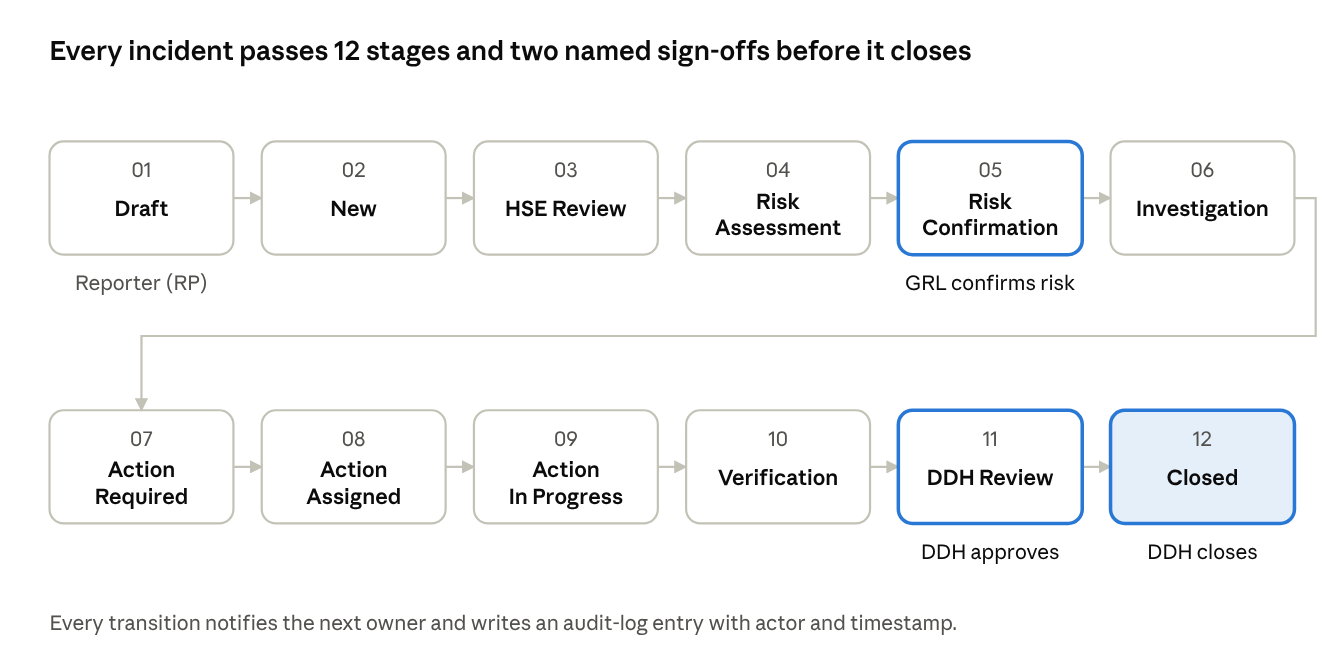
SurveilSync OSH incident lifecycle · 12 stages, 2 sign-off gates
A report can't skip ahead. The Group Response Leader (GRL) must confirm the risk before investigation starts, and the Designated Department Head (DDH) must approve the work before anything is closed. Actions are only closed after verification, so "done" means proven done.
Five roles, clear accountability
| Role | What they do |
|---|---|
| Reporting Person (RP) | Reports events, hazards and near misses, including through QR posters in the field |
| Group Response Leader (GRL) | Triages events, confirms risk, and assigns and reviews investigations and actions |
| Designated Department Head (DDH) | Reviews, approves or rejects, and closes incidents and actions |
| Admin | Configures the system and assigns roles |
| Viewer | Read-only access for oversight and stakeholders |
Rights are set per user, and each lifecycle stage is mapped to the role responsible for it. When a company's structure changes, the workflow changes with it, with no code rewrite.
Every record is traceable
Each record gets an automatic ID: incidents (PCL-IN), investigations (PCL-INV), action items (PCL-AI), inspections (PCL-INS), meetings (PCL-MTG), training (PCL-TRN) and drills (PCL-DRL), each followed by the year and a six-digit number. Every action links back to the record that created it, so any finding can be traced to an accountable person.
What it changes for a safety team
| Before | With SurveilSync OSH |
|---|---|
| Hazards reported by email, chat or not at all | One-scan QR reporting from the site, pre-filled with location |
| Risk ratings vary by who fills in the form | A consistent likelihood × consequence score, confirmed by a named lead |
| Findings scattered across notebooks and spreadsheets | Every finding in one CAPA register, with an owner and a date |
| Overdue actions found at the next audit | Overdue actions flagged on the dashboard the day they slip |
| Days spent pulling evidence for auditors | Filtered reports exported in minutes, with a full audit log |
| Lessons learned stay in the investigation report | AI turns root causes into shift briefings and training modules |
Five design principles any safety system should follow
- Make reporting effortless. The fewer taps it takes, the more hazards you hear about.
- Give every finding an owner. An action without a name and a date is a wish, not a control.
- Gate the important decisions. Risk confirmation and closure belong to accountable roles, not whoever clicks first.
- Link everything. Every action should trace back to the incident, inspection or drill that created it.
- Let AI draft, let people decide. AI speeds up the paperwork; competent people own the judgement.
Need a system built around how your team really works?
IPRS Consultants designs and builds custom software that turns complex compliance requirements into simple daily workflows. SurveilSync OSH is one example. Your industry, your framework and your workflow could be the next.
Frequently asked questions
Is SurveilSync OSH OSHA compliant?
No software makes an organization compliant on its own. SurveilSync OSH supports the practices OSHA expects, such as hazard reporting, risk assessment, incident investigation, corrective action, training records and recordkeeping. Compliance still depends on how each employer applies them.
How does it relate to NEBOSH?
NEBOSH is a qualification body that trains health and safety professionals. SurveilSync OSH follows the same management-system approach NEBOSH teaches, so NEBOSH-qualified practitioners will recognize its risk assessment, investigation and control workflows.
What is ILO-OSH 2001?
ILO-OSH 2001 is the International Labour Organization's guideline for occupational safety and health management systems. It sets out a cycle of policy, organising, planning and implementation, evaluation and improvement. SurveilSync OSH maps more than 90 of its requirements.
Does the AI make safety decisions?
No. AI suggests risk scores, root causes and actions. A Group Response Leader confirms the risk, and a Designated Department Head approves and closes incidents and actions.
Can frontline workers use it without training?
Yes. Workers scan a QR code poster on site, and the report form opens with the site and area already filled in. It works on any phone.
Can it handle more than one site?
Yes. Sites, departments, categories, roles and workflow responsibilities are all configurable, so one system can cover a whole organization.
Need a system built around how your team really works?
IPRS Consultants designs and builds custom software that turns complex compliance requirements into simple daily workflows. Tell us what your team needs to track, approve and prove.
Book a Free Discovery CallWritten by Qasim at IPRS Consultants. Our team brings 9 years of experience and has served more than 400 clients.